How a Podcast Planner Interior Can Simplify Your Show Management and Boost Creativity
Podcasting continues to grow as one of the most powerful ways to share ideas, build communities, and establish authority in virtually any niche. But behind every polished episode lies a surprising amount of preparation. From brainstorming topics and scheduling guests to mapping out segment flow and tracking release dates, the organizational demands can quickly become overwhelming. That's where a well-designed Podcast Planner Interior becomes an essential tool—not just for beginners, but for seasoned hosts who want to work smarter, not harder.
If you've ever sat down to record an episode only to realize you haven't outlined your talking points, or if you've struggled to maintain a consistent release schedule, you already understand the value of planning. A dedicated planner interior gives you a structured space to capture ideas, organize content, and manage your timeline—all in one place. In this article, we'll explore what a podcast planner interior is, why it matters, how you can use it to streamline your workflow, and what to look for when choosing or creating one.
What Is a Podcast Planner Interior?
A Podcast Planner Interior refers to the internal pages of a planner specifically designed for podcasters. Unlike a generic notebook or digital calendar, this interior is built around the unique workflow of planning, producing, and publishing a show. It typically includes dedicated sections for episode outlines, topic brainstorming, guest research, scheduling, and post-production notes.
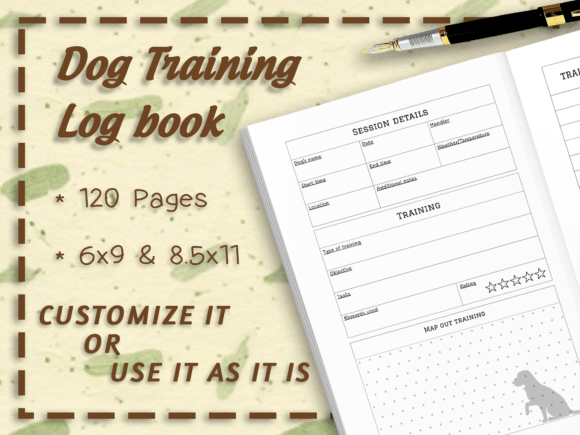
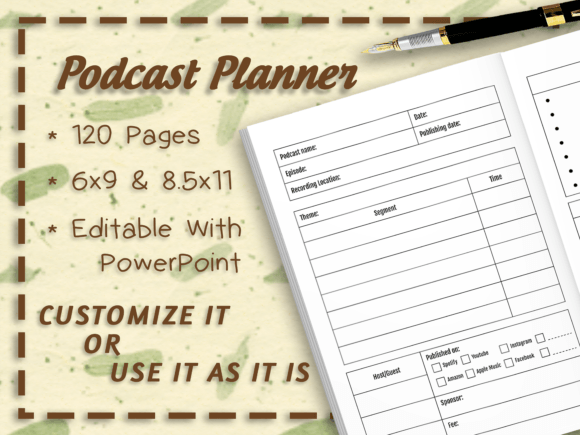
The interior described here contains 120 pages of carefully laid-out content, available in two popular trim sizes: 6" x 9" and 8.5" x 11". These sizes offer flexibility whether you prefer a compact, portable planner or a larger, more spacious layout. Importantly, the interior comes without bleed, meaning you can print it cleanly at home or through a professional service without worrying about content being cut off at the edges.
This type of interior is delivered as ready-to-upload PDF files, so you can start using it immediately—either for personal printing or for publishing on platforms like Amazon KDP, Etsy, or other marketplaces. For those who want to customize further, editable PPT (PowerPoint) files are also included, allowing you to change fonts, backgrounds, vectors, and even add or remove pages as needed.
Why a Dedicated Podcast Planner Matters
Many podcasters start with a simple notebook or a basic spreadsheet. While these can work in the short term, they quickly reveal limitations as the show grows. Here's why a purpose-built podcast planner interior makes a tangible difference:
1. Centralizes Your Workflow
Instead of juggling sticky notes, digital files, and scattered ideas, a planner interior keeps everything in one structured location. You can see your entire season at a glance, from topic queues to guest confirmations to recording dates.
2. Encourages Consistent Content Planning
Consistency is key in podcasting—both in release schedule and content quality. A planner interior prompts you to think ahead, plan topics in advance, and avoid last-minute scrambles. This leads to better episodes and a more loyal audience.
3. Reduces Cognitive Load
When you offload your planning to a structured system, your brain is free to focus on creativity and delivery during recording. You spend less energy remembering what you need to do and more energy creating valuable content.
4. Supports Long-Term Show Growth
With dedicated pages for tracking metrics, listener feedback, and episode performance, a planner interior helps you identify patterns and make data-informed decisions about your show's direction.
Key Features of the 120-Page Podcast Planner Interior
Let's break down what you'll find inside this particular planner interior and how each feature supports your podcasting workflow.
Episode Planning Pages
Each episode gets its own dedicated spread where you can outline the main topic, key talking points, segments, and call-to-action. This ensures you walk into every recording session with a clear roadmap, reducing rambling and improving episode flow.
Topic Brainstorming Sections
Ideas can strike at any moment. The planner includes designated areas for capturing and developing episode ideas. You can list potential topics, note why they matter to your audience, and prioritize them based on relevance and timeliness.
Scheduling and Calendar Views
Managing a publishing schedule is one of the most challenging aspects of podcasting. The interior provides space to map out recording dates, editing deadlines, guest interviews, and release days. This visual overview helps you avoid overcommitting and ensures you maintain a steady cadence.
Guest and Interview Management
If you host guests, you know how much coordination is involved. The planner includes dedicated pages for guest contact information, topic preferences, episode notes, and follow-up tasks. This keeps your guest management organized and professional.
Post-Production and Release Checklists
From editing and show notes to social media promotion, the post-production phase has many moving parts. The interior includes checklists that help you track each step so nothing falls through the cracks.
Notes and Reflection Pages
Continuous improvement is easier when you reflect on your episodes. The planner provides space to note what went well, what could be improved, and listener feedback you want to incorporate.
How to Use the Podcast Planner Interior Effectively
Having a great planner interior is only half the equation. Using it consistently is where the real transformation happens. Here are practical strategies to get the most out of your 120-page podcast planner.
Start with a Quarterly or Seasonal Overview
Before diving into individual episodes, take time to map out a broad view of your upcoming quarter or season. Identify major themes, potential guest opportunities, and key dates (holidays, industry events, product launches) that align with your content. This macro-level planning helps you maintain thematic coherence across episodes.
Use the Brainstorming Pages Freely
Don't censor yourself during idea generation. Write down every topic that comes to mind, even if it seems rough or unpolished. Later, you can refine and prioritize. The act of capturing ideas on paper often sparks new connections you wouldn't have discovered otherwise.
Set a Weekly Planning Ritual
Dedicate 15–30 minutes each week to update your planner. Review upcoming episodes, check guest communications, and adjust your schedule if needed. This ritual keeps you proactive rather than reactive.
Customize the Interior to Match Your Brand
Because the planner comes with editable PPT files, you can personalize fonts, colors, and backgrounds to reflect your show's visual identity. This not only makes the planner more enjoyable to use but also reinforces your brand every time you open it.
Print or Publish According to Your Needs
Whether you prefer a physical notebook you can annotate by hand or a digital version you can edit on your tablet, the flexibility of this interior accommodates both. The PDF files are print-ready, and the PPT files allow for digital manipulation.
Common Misunderstandings About Podcast Planners
Some podcasters assume that a planner interior is only for beginners or that it adds unnecessary bureaucracy to a creative process. In reality, a structured planning system benefits hosts at every level. Here are a few misconceptions worth addressing:
- "Planners stifle creativity." Actually, they do the opposite. By handling logistics and structure, they free mental energy for creative thinking during recording and content development.
- "I can just use a digital tool." Digital tools are excellent for certain tasks, but many podcasters find that writing by hand improves memory, clarity, and idea generation. A physical planner interior offers a screen-free, focused planning experience.
- "I don't need that many pages." 120 pages may sound like a lot, but when you factor in episode outlines, brainstorming, scheduling, guest notes, and reflection pages, the space fills up quickly—especially if you plan multiple episodes ahead.
- "Customization is too complex." The included PPT files make it straightforward to change fonts, backgrounds, and page layouts. Even basic PowerPoint skills are enough to create a unique interior that stands out from generic templates.
Why This Interior Is Suitable for Personal Use and Publishing
One of the standout features of this Podcast Planner Interior is its dual-purpose design. You can use it for your own planning needs or repurpose it as a product to sell on publishing platforms. The two trim sizes (6" x 9" and 8.5" x 11") give you flexibility for different markets and printing preferences.
The no-bleed specification simplifies the printing process. Whether you're printing at home on standard paper or using a print-on-demand service, you won't have to worry about content being trimmed incorrectly. The PDFs are ready to upload, which saves hours of formatting work.
For those who want to differentiate their product, the editable PPT files allow you to change fonts, backgrounds, and vector elements. This means you can create a version that reflects your unique aesthetic—or offer multiple variations to appeal to different buyer preferences. As the provider suggests, customizing these elements helps your product look distinct and professional.
Practical Tips for Getting the Best Results
- Choose the right trim size for your workflow. The 6" x 9" size is ideal for portability and fits easily in a bag. The 8.5" x 11" size offers more writing space per page and is better suited for detailed planning at a desk.
- Invest in quality paper if printing at home. A thicker, slightly textured paper improves the writing experience and makes the planner feel more substantial.
- Use color coding to organize sections. Assign different colors to episode planning, guest management, scheduling, and notes. This visual system helps you navigate the planner quickly.
- Back up your custom PPT files. Once you've invested time in personalizing fonts and backgrounds, save your work in multiple locations to avoid losing your customization.
- Reach out for support if needed. The provider explicitly encourages contact if you encounter any issues downloading or using the files. Don't hesitate to ask for help—it's part of the service.
How This Planner Fits into Modern Podcasting Life
Podcasting has evolved from a niche hobby into a mainstream medium used by entrepreneurs, educators, creatives, and businesses of all sizes. With this growth comes the need for professional-grade organizational tools. A simple notebook no longer cuts it when you're managing multiple episodes, coordinating with guests, and tracking performance metrics.
The 120-page Podcast Planner Interior bridges the gap between creative freedom and operational discipline. It gives you a dedicated space to think strategically about your content while keeping the tactical details from slipping through the cracks. In a world where attention is fragmented and schedules are packed, having a reliable planning system is not a luxury—it's a necessity for sustainable podcasting.
Moreover, because the interior is customizable, it adapts to your specific workflow rather than forcing you into a rigid template. Whether you're a solo podcaster, a co-hosted show, or an interview-based format, you can tailor the pages to match your unique process.
Final Thoughts
A Podcast Planner Interior with 120 pages offers the structure and flexibility that modern podcasters need to manage their shows effectively. By centralizing your content planning, scheduling, guest management, and post-production tasks, it reduces stress and improves the quality of your episodes. The availability of two trim sizes, no-bleed PDFs, and editable PPT files makes it suitable for both personal use and commercial publishing.
If you're ready to take your podcast organization to the next level, this interior provides a ready-made foundation. And because you can customize the fonts, backgrounds, and vector elements, you'll end up with a planner that feels uniquely yours—one that supports your creativity rather than constraining it. Start planning, stay consistent, and watch your show thrive.