Designing a Winning Printable Application for Employment
A blank application form is a canvas, and far too many businesses treat it like a chore rather than a strategic touchpoint. For graphic designers, the humble Printable Application for Employment represents a unique challenge in visual communication and brand reinforcement. It is a functional document, yes, but it is also the first piece of company collateral a potential candidate handles physically or opens digitally. Getting its design right means balancing strict usability with your brand identity, creating a seamless experience that respects the applicant’s time while reinforcing your organization’s professionalism.
Why Your Form Is a Design Asset
Every touchpoint matters in modern branding, and employment forms are often overlooked in favor of flashier items like logo design or social media graphics. However, a well-crafted application form directly impacts your hiring funnel. A cluttered, confusing layout can frustrate qualified candidates or even discourage them from applying. Conversely, a clean, visually organized document signals that your company values clarity and efficiency. From a graphic design perspective, this is an opportunity to embed your visual identity into a highly practical tool, strengthening brand identity through consistent typography, color palette usage, and structural coherence.
Establishing Visual Hierarchy
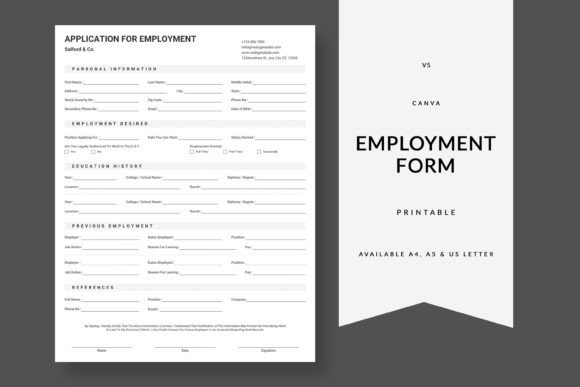
The core challenge of any form design is guiding the user’s eye logically from one section to the next. A strong visual hierarchy ensures that the applicant instinctively knows where to start and how to move forward. Group related information—such as personal details, employment history, and references—into clearly defined blocks with distinct headings. Use negative space generously; a crowded page feels overwhelming and lowers usability. By applying the same layout principles you use in web design or editorial design, you create a frictionless path that reduces errors and incomplete submissions.
Typography and Readability
Readability is paramount when designing a functional document. Choose sans-serif typefaces such as Roboto, Inter, or Open Sans for form labels and instructions. These fonts render clearly both on screen and in print, ensuring accessibility across different media. Combine them with a clean serif or a heavier weight for section headers to establish a clear typographic hierarchy. Always consider the final output: text that looks crisp in a digital PDF may become muddy when photocopied, so avoid hairline weights and low-contrast color combinations. Good typography is invisible design that makes the Printable Application for Employment effortless to process.
Strategic Applications Across Media
Whether your client operates primarily in print, digital marketing, or a hybrid environment, the design of their employment form must adapt without losing its core identity. Here are key considerations for different delivery methods:
- Print Design: Account for standard printer margins and avoid placing critical text too close to the edge. Use light, neutral backgrounds instead of pure white to reduce glare under office lighting and make handwritten entries easier to read.
- Digital PDFs: Incorporate fillable fields, checkboxes, and dropdown menus to improve user experience. Ensure the file is tagged for accessibility so screen readers can navigate it seamlessly, reflecting a commitment to inclusive design.
- Brand Consistency: Mirror the color palette, logo placement, and visual style used across other HR documents such as offer letters and onboarding packets. This creates a cohesive brand system that builds trust before the candidate even steps through the door.
Practical Tips for Designers and Creatives
When evaluating or building a form, treat it as you would any other creative asset. A thoughtful approach can transform a mundane administrative task into a positive brand interaction. Consider these actionable recommendations for your next project:
- Audit for visual clutter. Remove any unnecessary boxes, heavy borders, or decorative elements that do not serve a functional purpose. Every element should enhance clarity.
- Test your color usage. While a bold accent color adds modern aesthetics, ensure sufficient contrast between question text and background to meet WCAG accessibility standards. Avoid relying on color alone to convey required fields—add an asterisk or label.
- Prioritize handwriting space. If the form will be printed and filled out by hand, provide adequate vertical space for each entry. Cramped fields lead to illegible answers and user frustration.
- Design for scalability. Keep the layout modular so that additional sections can be added or removed without breaking the overall composition. This flexibility is valuable for companies with varying hiring needs.
The Role of Color, Composition, and UX
Applying professional graphic design principles to an employment form directly impacts user engagement and completion rates. A strategic color palette does more than look pretty—it directs attention to action areas such as signature blocks or required fields. A strong composition uses alignment and spacing to create a sense of order, reducing cognitive load for the applicant. This is where the intersection of UI design and print design becomes clear: a form is fundamentally a user interface. Whether the user is on a laptop or sitting at a table with a pen, the experience should feel intuitive and respectful of their time.
Ultimately, the most effective designs are invisible—they guide the user seamlessly from one section to the next without friction. By applying the same rigor you bring to logo design, packaging, or web design to your Printable Application for Employment, you elevate a routine document into a powerful extension of your brand. It demonstrates attention to detail, respects the candidate’s effort, and sets the stage for a positive working relationship before a single interview takes place. Quality creative assets are not just about aesthetics; they are about building trust through thoughtful, functional design.